Microsoft Defender for Cloud Service has officially been integrated into the Defender Security Portal, marking a significant development for cloud security management. In this blog, we will explore this integration, discussing how it enhances the security posture of cloud environments, streamlines security operations, and improves threat detection and response. We’ll examine the new features introduced, the benefits they bring to organisations utilising cloud services, and how this change aligns with best practices in cloud security.
Defender for Cloud in the Defender portal
Microsoft Defender for Cloud is enhancing its offerings by integrating into the Microsoft Defender Portal, aiming to create a cohesive security experience that encompasses both Cloud and code environments. As part of this initiative, several features are now available in the Microsoft Defender Portal, with plans to introduce additional capabilities in the future.
This development is intended to achieve the following objectives:
- Unlock new experiences for Cloud and posture management.
- Foster deep integration with other Microsoft security services.
- Streamline workflows for security teams by consolidating all tools within a single portal.
Unified Security Dashboard
The main reason for this feature integration is to provide a single, unified security dashboard for the organisation’s security team. Microsoft is unifying its security offerings into the Microsoft Defender security portal, integrating threat detection and security management across all environments. This integration feature is now in public preview within this centralised experience, allowing monitoring of cloud infrastructure, endpoints, identities, and GitHub organisations from one control centre. This change signifies a shift from isolated tools to a unified operations centrefor streamlined security operations.
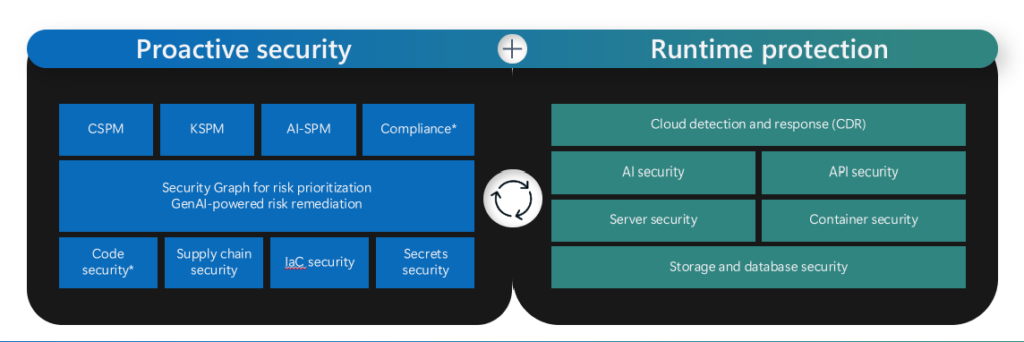
To enable this integration, complete the steps below:
To enable preview features in the Microsoft Defender portal, go to the following path:
Settings > Microsoft Defender XDR > General > Preview features. From there, you can toggle the preview features.
It’s important to ensure that both “Microsoft Defender XDR” and “Microsoft Defender for Cloud” are selected to access the full range of functionality.
Defender for Cloud – Integration Benefits
The integration provides the following key features and benefits:
- Cloud Overview Dashboard: The Cloud Overview Dashboard provides a centralised view for posture management and threat protection, enabling security teams to monitor their environment effectively. It emphasises key improvement actions to reduce risks and provides workload-specific insights, enabling users to track security progress over time effortlessly.
- Cloud Asset Inventory: This feature provides a thorough inventory, offering a comprehensive view of Cloud and code assets across Azure, AWS, and GCP. Assets are organised by workload, criticality, and coverage, integrating health data, asset actions, and risk signals. Information security and Security Operations Centre (SOC) teams can quickly access resource-specific views, exposure maps, and pertinent metadata, enabling them to address security recommendations and respond to threats more efficiently.
- Unified Cloud Security Posture Capabilities: With all cloud security posture management (CSPM) features consolidated into the Microsoft Security Exposure Management (MSEM), security teams can easily view secure scores, prioritised recommendations, attack paths, and vulnerabilities within a single interface. This holistic perspective covers devices, identities, SaaS applications, and data, empowering organisations to reduce risks effectively.
- Granular Access Management: Security teams can provide targeted access to security content, ensuring only relevant users have visibility to the necessary information. This enables users to access security insights without requiring direct permissions to resources, thereby improving operational security and compliance. A new cloud scopes capability allows organisations to organise cloud accounts—such as Azure subscriptions, AWS accounts, and GCP projects—into logical groups. This structure enhances data pivoting and role-based access control (RBAC), enabling segmentation by business units, regions, or workloads, with persistent filtering across dashboards and workflows.
Feature Comparison
This section offers an in-depth comparison of Microsoft Defender for Cloud’s features and capabilities, highlighting the differences between the Azure and Defender portals. By understanding these differences, you can make informed decisions about which platform best suits your security operations and fully leverage the enhanced functionalities until the full scope is available in the Defender portal.
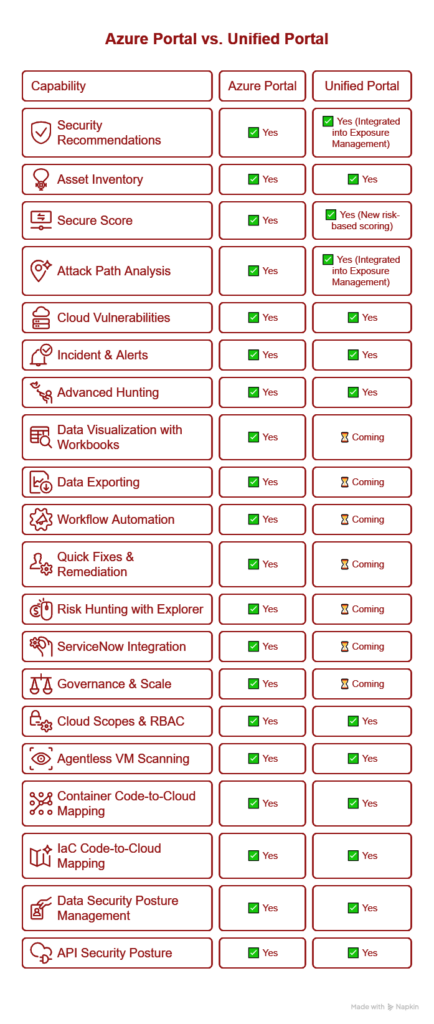
Please visit the link and read more about the integration, known limitations
The Microsoft Defender portal unifies security across endpoints, identities, email, and cloud resources, enhancing protection and detection through integrated solutions. Leveraging AI and global threat intelligence, it enables faster risk identification and proactive defence against attacks.

Santhosh has over 15 years of experience in the IT organization. Working as a Cloud Infrastructure Architect and has a wide range of expertise in Microsoft technologies, with a specialization in public & private cloud services for enterprise customers. My varied background includes work in cloud computing, virtualization, storage, networks, automation and DevOps.