Last year, Azure announced new capabilities in the Azure Application Gateway. The Azure Application Gateway service provides more capabilities with Layer 7 (HTTP, HTTPS, WebSockets, and HTTP/2). The capabilities are extended to support Layer 4 (TCP) and TLS (Transport Layer Security) proxying. In this blog post, we will explore the new capabilities and unlock the additional features.
What is Azure Application Gateway?
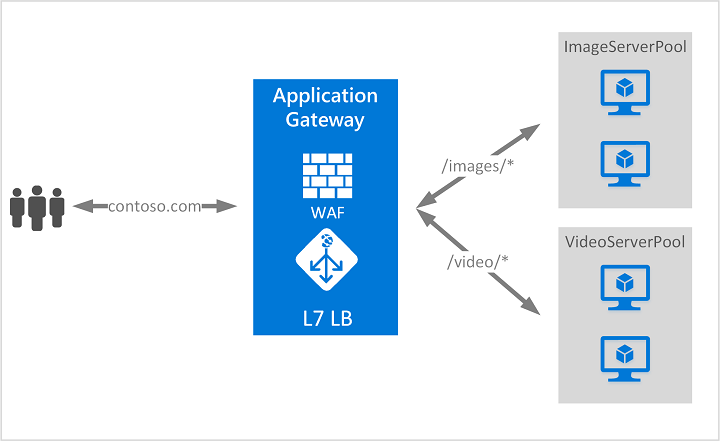
The Azure Application Gateway is part of the Azure load balancer family [Networking services] and operates at the application layer (OSI Layer 7). This service is called a reverse proxy solution. It provides security features such as SSL/TLS termination, autoscaling, zone redundancy, and integration with the Azure Web Application Firewall (WAF) for applications.
The application gateway differs from a network load balancer, which makes routing decisions based on HTTP request attributes such as URL paths and host headers.
The diagram below provides clear information on how it works:
TLS/TCP proxy capabilities
Before these features were introduced, the Azure Application Gateway was used for Layer 7 HTTP(S) traffic. If Layer 4 traffic is required, we need to depend on Azure load balancer services. This provides multiple entry points and different frontend IP addresses for Layer 7 & 4 traffic (public or private).
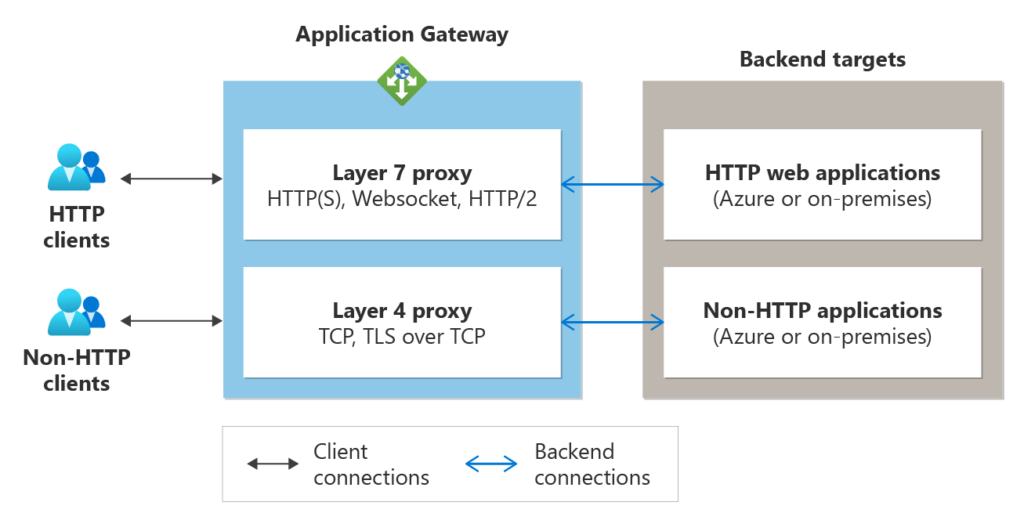
The new TLS/TCP proxy capabilities introduced with the Azure Application Gateway (v2 SKU) help keep it as a single entry point. This eliminates the need for an additional load balancer service for the application. With this, both Layer 7 and Layer 4 routing through the application gateway use the same frontend IP configuration. This way, you can direct all your clients to a single IP address (public or private), and the same gateway resource will route them based on the configured listener protocols and the ports.
Note: The Azure Application Gateway v1 will be depreceated by April 28, 2026. Please read Azure technial notes about this retirement.
The Application Gateway works as a reverse proxy. It operates at Layer 4, as it does at Layer 7. When a client connects to the Application Gateway, it starts a new TCP connection to a backend server from the backend pool. The below diagram shows the capabilities of Azure application gateway:
Limitations:
This feature has a few limitations:
- The Azure WAF on Application Gateway does not inspect traffic on TLS and TCP listeners for exploits and vulnerabilities.
- UDP traffic isn’t supported at this time.
- Azure Application Gateway Ingress Controller does not support this feature.
Comparison of Azure load balancer and Azure application gateway
The table below provides a concise comparison of the key features of Azure Application Gateway and Azure Load Balancer.
| Feature | Azure Application Gateway | Azure Load Balancer |
| Type | TCP, TLS, & Supports HTTP and non-HTTP workloads. | Layer-4 pass-through network device. |
| Protocols | TCP, TLS & Supports HTTP and non-HTTP workloads. | TCP, UDP, & Primarily handles TCP and UDP traffic. |
| Security | Centralised TLS termination and integrates with Azure Key Vault. | Basic traffic routing, no advanced security features. |
| Performance | Advanced application routing and session persistence. | Complete traffic control with inbound and outbound capabilities. |
Conclusion
The TCP/TLS proxy feature enables the application gateway service to simplify Layer 7 & 4 requirements for external traffic, including HTTP and non-HTTP.

Santhosh has over 15 years of experience in the IT organization. Working as a Cloud Infrastructure Architect and has a wide range of expertise in Microsoft technologies, with a specialization in public & private cloud services for enterprise customers. My varied background includes work in cloud computing, virtualization, storage, networks, automation and DevOps.